


Boba Tea Bubble DIY
4.0228.00 Reviews
App Specs
- Version
- 1.6.2
- Updated On
- License
- Free
- Downloads
- 10,000,000+
- Developer
- QUEEN CITY
- Categories
- Simulation
- Platform
- Android, iOS
Screenshots



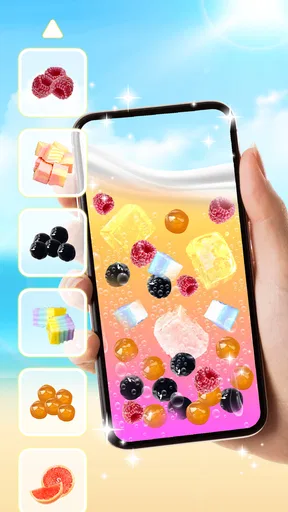
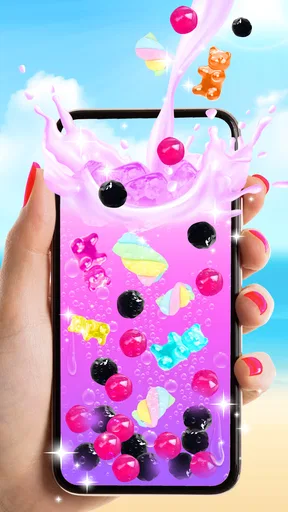

 Analysis by AppCompare
I’d treat Boba Tea Bubble DIY as a small, playful simulation rather than a substitute for a full management game or a guide to making real bubble tea. Its appeal is immediate: it gives me a quick way to play with drink-making, colors, and presentation without asking me to plan a shop or learn a complicated system. That makes it easiest to recommend when I want a light distraction, not a long-term game with goals to chase.
What the free price means in practice
The game is free to download, so trying it does not require an upfront purchase. It does include in-app purchases, with items priced from $1.99 to $4.99 each. I’d separate those two points when judging its value: the basic decision to give it a try costs nothing, while spending is optional and should depend on whether the experience already feels enjoyable to you. I wouldn’t pay simply because the game is free to install; I’d first see whether its style of casual drink-making holds my attention.
QUEEN CITY’s game has a 3.8 average from around 8,700 ratings, and it has passed 10 million installs. Those figures suggest that it has reached a broad audience, but they don’t tell me whether its particular pace will suit you. The rating is a useful nudge to approach it with measured expectations rather than assume every player will find it equally engaging. It is rated for Everyone, and the current version is 1.6.0, with Android 8.0 as the minimum operating system.
Where the experience earns its keep
For me, the strongest value is the focused, low-pressure activity: choose ingredients, shape a drink, and enjoy the visual result. That’s a narrower proposition than a typical simulation built around running a business, managing resources, or completing a growing list of objectives. If you want a moment of playful customization, that narrow focus is a strength. If you need a game to keep giving you new strategic decisions, it may feel slight by comparison.
A useful way to approach it is to make a small personal challenge out of each session. I might decide to build a drink around one color, or aim for a combination that looks deliberately unusual, instead of tapping through choices at random. This gives the customization a little direction without pretending that the game has a deeper progression system. It also helps me decide sooner whether I enjoy the process enough to keep playing.
It can fit a real everyday gap: a short break while waiting for a friend, or a quiet few minutes when I want something more hands-on than scrolling but less demanding than a puzzle that needs sustained concentration. The trade-off is that this kind of use depends on enjoying the activity itself. Players who need unlocks, competition, or a story to make a session feel worthwhile may be better served by another simulation game.
Trade-offs to consider before spending
The purchase range is clear, but the value of any individual item depends on what it adds to your own enjoyment. I’d avoid treating optional purchases as a shortcut to a better game until I knew what I wanted from them. A sensible approach is to play the free version first, notice what feels repetitive or limited for you, and only then decide whether an item at $1.99–$4.99 addresses that specific issue. If it doesn’t, keeping your money is the better choice.
Worth Reading Before You Choose

EA SPORTS FC Mobile 26 Is a Bigger Football Game, but It Takes Time

Flipboard Shows What News Apps Must Do Beyond the Feed

Switching to Android Auto Means Rethinking Your Driving Routine

Google Calendar Makes a Crowded Week Easier to Manage

Ludo King Makes the Most of the Minutes Between Plans

Baby Panda World Brings Quick Play to Modern Phones, but Its Game Library Feels Busy
It is also worth keeping expectations grounded: a virtual drink-making game can offer playful presentation, but it cannot teach the practical details of preparing a real cup or help you choose ingredients at a shop. For recipes or hands-on cooking guidance, a dedicated recipe source is a better fit. For a broader café simulation, choose a game that makes running the business its central activity. This one makes more sense when the drink itself is the point.
Before settling in, I’d also check that the casual format suits the person who will use it. Its Everyone age rating makes it an option for a wide audience, but an age label does not guarantee that every child will enjoy the same pace or want to make drinks on a screen. For a younger player, I’d keep purchases in mind and make sure the device’s purchase controls match your household rules. Adults who simply want a brief, colorful diversion can judge it on the same basic question: is experimenting with virtual drinks fun enough on its own?
Who is likely to get the most from it?
I’d point it toward someone who likes the visual side of bubble tea and wants a relaxed activity without much pressure. It may also suit a person who enjoys inventing combinations or sharing a playful creation with friends, as long as social sharing is part of their own routine. I would skip it if my priority were realistic food preparation, detailed business management, deep strategic choices, or a substantial campaign. The best alternative depends on that preference: a recipe app for real-world instructions, or a more systems-heavy simulation for ongoing management.
One practical tip is to decide what makes a session satisfying before opening the game. If it is the act of trying a new-looking combination, focus on that and stop once you’ve made something you like. If you find yourself tapping through choices without enjoying the result, that is a sign the game’s central loop may not be a good match, rather than a reason to buy something. This keeps the free trial of the experience useful: it helps you learn whether the style fits your downtime.
There are a few straightforward questions I’d ask before downloading. Does it cost anything to start? No, it is free to download, though optional in-app purchases are available. Is it suitable for all ages? Its content rating is Everyone, while purchase settings are still worth checking for younger players. Will it replace a full café-management game or teach a real recipe? No: it is best approached as a casual drink-themed game. Does it need a recent Android device? It requires Android 8.0 or later.
With those expectations set, I can judge the game on the thing it is actually trying to offer: a light, customizable bubble-tea activity. I would begin without spending, give it a few short sessions, and see whether the making and presentation stay enjoyable. If they do, its free entry makes it easy to keep around; if not, there is little reason to force it into a role better filled by a deeper simulation or a real recipe guide.
First Impressions
As soon as I launched Boba Tea Bubble DIY, I was hit with an explosion of colors and fun animations. The interface is super friendly and inviting, making it clear that this app is all about having a good time. Whether you're a boba tea newbie or a seasoned sipper, the app's layout is intuitive enough to get you started on your bubble tea journey.
The app opens with a quick tutorial, which is perfect for those of us who might need a little guidance before diving into our creative concoctions. It’s clear that the developers put a lot of thought into making sure users can easily navigate and enjoy their experience without feeling overwhelmed.
Crafting Your Perfect Cup
Now, onto the fun part—creating your very own bubble tea! The app offers a wide array of options to customize your drink. From choosing your base tea to picking your favorite milk and deciding on the amount and type of boba, you can literally make hundreds of combinations. I found myself lost in the possibilities, trying to craft the perfect drink that matched my mood of the day.
One of the coolest features is the ability to mix and match different flavors. The app provides a colorful palette of options, allowing you to experiment and find that sweet spot of flavor that’s just right for you. And let me tell you, seeing the boba pearls swirl around in your virtual cup is oddly satisfying!
Interactive and Engaging
What sets this app apart is its interactive elements. It’s not just about mixing and matching ingredients. The app lets you "shake" your device to mix your drink, adding a tactile sensation to the experience. Plus, you can "sip" your creation and watch as the tea level drops, adding a layer of realism that’s both engaging and entertaining.
The graphics are top-notch and the sound effects are spot-on, making the entire experience feel as close to the real thing as possible. I found myself genuinely smiling as I played around with different drink combinations and watched the app bring my creations to life.
Sharing with Friends
Let’s be honest, part of the fun of making a beautiful boba tea is showing it off. The app makes it easy to share your creations with friends on social media. You can snap a picture of your drink and post it directly from the app, complete with cute stickers and backgrounds to add a personal touch. It’s a great way to connect with fellow boba enthusiasts and maybe even inspire a few friends to join in on the fun.
Final Thoughts
In a nutshell, Boba Tea Bubble DIY is a delightful app that brings the joy of crafting personalized bubble teas to life. It's not just an app for making virtual drinks; it's an experience that captures the essence of what makes boba tea so beloved. From its vibrant graphics to its interactive features, it’s an app that’s sure to bring a smile to your face.
Whether you’re a boba tea expert or just someone looking to have a little fun, I highly recommend giving this app a try. It’s a refreshing way to relax and unleash your creativity. So go ahead, download it, and let your imagination run wild in the world of boba tea!
Pros
- Intuitive interface for easy navigation.
- Variety of bubble tea recipes to explore.
- Customizable options for personalized drinks.
- Engaging graphics enhance user experience.
- Frequent updates with new features.
Cons
- Contains ads that might disrupt gameplay.
- In-app purchases can be expensive.
- Limited offline functionality.
- May require frequent updates for stability.
- Some features locked behind a paywall.
FAQs for Boba Tea Bubble DIY
What is Boba Tea Bubble DIY, and what can I do with it?
Boba Tea Bubble DIY is a fun and interactive mobile game that allows users to create and customize their own virtual boba tea drinks. Players can choose from various ingredients, flavors, and toppings to design unique beverages. The game offers a relaxing and creative experience, perfect for boba tea enthusiasts and casual gamers alike.
Is Boba Tea Bubble DIY free to play, and are there any in-app purchases?
Yes, Boba Tea Bubble DIY is free to download and play. However, the game offers optional in-app purchases that provide additional ingredients, customizations, and cosmetic items. These purchases are not necessary to enjoy the game but can enhance the experience for those who want more variety in their creations.
What age group is Boba Tea Bubble DIY suitable for?
Boba Tea Bubble DIY is designed to be family-friendly and is suitable for players of all ages. Its simple and intuitive interface makes it accessible for children, while the creative customization options can also appeal to older players. Parental guidance is recommended for young children due to the presence of in-app purchases.
Can I play Boba Tea Bubble DIY offline, or do I need an internet connection?
Boba Tea Bubble DIY can be played offline, making it a great option for on-the-go entertainment without the need for an internet connection. However, certain features, such as in-app purchases or updates, may require connectivity. For the full experience, occasional internet access is recommended.
Are there any ads in Boba Tea Bubble DIY, and how can I remove them?
Yes, Boba Tea Bubble DIY contains ads to support its free-to-play model. These ads can occasionally interrupt gameplay. To remove ads, players can make a one-time purchase within the app, which will enhance the gaming experience by providing uninterrupted play. The option to remove ads is available in the settings menu.


